How Office Tenants Avoid IT Downtime on Move Weekends

Commercial Moving
Residential Moving
Get Your Free Estimate
"*" indicates required fields






A clean office move is invisible to employees on Monday morning, but only when IT planning runs in parallel with the move itself. From device inventory and backups to server room provisioning, workstation sequencing, network lead times, and weekend testing, this guide covers how Bay Area office tenants prevent the Monday outages that cost more than the move itself.
A clean office move is invisible to most employees on Monday morning. The team walks in, sits down, logs in, and gets back to work. Behind that simple experience is a weekend of careful IT planning. When the planning fails, the office returns to Monday outages that cost more than the entire move. Neostart helps office tenants avoid IT downtime on move weekends across Bay Area commercial markets. Learn how the team approaches it and why you need professional help.
Start IT Planning Before the Move Itself
IT planning often gets pushed to the last week before the move. By then, the moving company has been booked, the boxes have been packed, and the schedule is locked. Adding complex IT requirements at that stage creates avoidable problems.
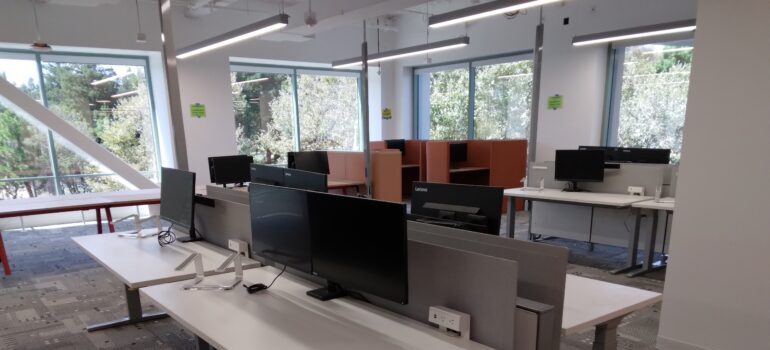
The better approach starts IT planning at the same time as move planning. The IT lead joins the initial walkthrough. The team handling Bay Area commercial moving projects knows the equipment inventory before the move date. Cabling requirements, server room conditions, and workstation reconnection plans all get scoped during the original estimate.
Inventory Every Connected Device
The first IT step is a complete inventory of every device that needs to move. Servers and storage systems. Network switches, routers, and firewalls. Workstations, monitors, docking stations, and peripherals. Conference room AV equipment. Printers and copiers. Phone systems and conferencing endpoints.
Each device gets labeled with its origin location, its destination location, and any specific handling requirements. The inventory becomes the master document for the entire IT side of the move. Without it, equipment arrives at the new office without a clear destination, and the reconnection phase runs blind.
Back Up Before You Move
The single most important IT step before any office move is a verified backup of every critical system. Server hard drives can fail during transport. Cables can get damaged. Equipment can be stolen in worst-case scenarios.
The Cybersecurity and Infrastructure Security Agency covers practical guidance on data protection and recovery planning. Most offices run regular backups already, but a move is the right time to verify those backups actually restore correctly. A backup that has never been tested is not a backup.
Plan the Server Room Move Separately
Server rooms require their own planning track within the larger office move. Power, cooling, network connectivity, and physical access all need confirmation at the new location. This happens before any equipment moves.
The right sequence provisions the new server room first. Power and cooling get tested. Network connectivity gets installed. Only then do the servers move. Moving servers into an unprepared server room creates downtime that planning could have prevented. The team handling the move coordinates with the IT team on this sequence.
Sequence the Workstation Move
Workstations cannot all move at once if the office needs to stay operational up to the last day. Most tenants phase the workstation move across one or two weekends with a deliberate sequence.
A typical sequence runs in this order. Friday after-hours: disconnect workstations and label every cable. Friday night: transport. Saturday: reconnect workstations at the destination and test each one. Sunday: final configuration and quality checks. Monday morning: employees return to functioning workstations. Professional furniture installation work runs in parallel, so the workstations and the cubicles come together at the same time.
Network Provisioning Lead Times
Internet service and network provisioning often have the longest lead times in the entire move. New ISP service installations can take four to eight weeks. Static IP assignments, dedicated lines, and circuit upgrades all add time.

The right move starts ISP coordination as soon as the new lease is signed. Waiting until the move date is locked guarantees that internet service will not be ready on Monday morning. Corporate hubs like Pleasanton’s Hacienda Business Park and San Ramon’s Bishop Ranch sometimes face longer provisioning timelines. High-capacity circuits at these properties take extra lead time. For tenants that depend on specific network speeds or redundancy, the network provisioning timeline often dictates the entire move calendar.
Phone Systems and VoIP Migration
Phone systems used to require physical installations. VoIP changed that for most offices, but the migration still involves planning. Number porting between carriers can take days. Conference room phones need configuration. Call routing rules need to follow the team to the new office. The IT team usually handles the configuration. The move team handles the physical equipment. Coordinating the two means the phones work on Monday morning instead of going to voicemail.
Coordinate Cable Management Before the Move
The way cables get organized at the new office determines how long the reconnection phase takes. A cluttered approach leaves the IT team untangling cables for days. A planned approach uses cable trays, labels, and a documented layout.
The right time to plan cable management is during the move planning, not after. Cable runs in the new office. Patch panel assignments. Cubicle power and data drops. All of this gets documented before move day. The IT team that walks in on Monday should see a labeled, organized environment.
Test Everything Before Monday
The Saturday and Sunday of move weekend are not just for connecting equipment. They are also for testing. Every workstation should boot, log in, and connect to all required systems. Also, every printer should print a test page. Every conference room should run a test call. Every shared folder, application, and cloud service should respond.
Testing happens before Monday, so any failures get diagnosed and fixed during the weekend. Skipping the testing phase means the IT team spends Monday morning solving problems while frustrated employees wait. Tech-heavy markets like Palo Alto and the Sand Hill Road corridor need extra testing time. Tenants there build full Sunday test windows into every office move.

Document the Final Configuration
The last IT step in a move is documentation. The new server room layout, cable runs, workstation assignments, network configuration, and phone system setup all need recording. This documentation matters for two reasons. First, it makes future changes easier. Second, it preserves institutional knowledge when IT staff turn over. Without it, the next IT lead inherits a configuration nobody understands. This is how office tenants avoid IT downtime on move weekends from start to finish. Plan your move with the right team. Contact Neostart for a written estimate.
Frequently Asked Questions
A clean office move is invisible to most employees on Monday morning. The team walks in, sits down, logs in, and gets back to work. Behind that simple experience is a weekend of careful IT planning. When the planning fails, the office returns to Monday outages that cost more than the entire move. Neostart helps office tenants avoid IT downtime on move weekends across Bay Area commercial markets. Learn how the team approaches it and why you need professional help. Start IT Planning Before the Move Itself IT planning often gets pushed to the last week before the move. By then, the moving company has been booked, the boxes have been packed, and the schedule is locked. Adding complex IT requirements at that stage creates avoidable problems. Office tenants avoid IT downtime on move weekends with the right team. The better approach starts IT planning at the same time as move planning. The IT lead joins the initial walkthrough. The team handling Bay Area commercial moving projects knows the equipment inventory before the move date. Cabling requirements, server room conditions, and workstation reconnection plans all get scoped during the original estimate. Inventory Every Connected Device The first IT step is a complete inventory of every device that needs to move. Servers and storage systems. Network switches, routers, and firewalls. Workstations, monitors, docking stations, and peripherals. Conference room AV equipment. Printers and copiers. Phone systems and conferencing endpoints. Each device gets labeled with its origin location, its destination location, and any specific handling requirements. The inventory becomes the master document for the entire IT side of the move. Without it, equipment arrives at the new office without a clear destination, and the reconnection phase runs blind. Back Up Before You Move The single most important IT step before any office move is a verified backup of every critical system. Server hard drives can fail during transport. Cables can get damaged. Equipment can be stolen in worst-case scenarios. The Cybersecurity and Infrastructure Security Agency covers practical guidance on data protection and recovery planning. Most offices run regular backups already, but a move is the right time to verify those backups actually restore correctly. A backup that has never been tested is not a backup. Plan the Server Room Move Separately Server rooms require their own planning track within the larger office move. Power, cooling, network connectivity, and physical access all need confirmation at the new location. This happens before any equipment moves. The right sequence provisions the new server room first. Power and cooling get tested. Network connectivity gets installed. Only then do the servers move. Moving servers into an unprepared server room creates downtime that planning could have prevented. The team handling the move coordinates with the IT team on this sequence. Sequence the Workstation Move Workstations cannot all move at once if the office needs to stay operational up to the last day. Most tenants phase the workstation move across one or two weekends with a deliberate sequence. A typical sequence runs in this order. Friday after-hours: disconnect workstations and label every cable. Friday night: transport. Saturday: reconnect workstations at the destination and test each one. Sunday: final configuration and quality checks. Monday morning: employees return to functioning workstations. Professional furniture installation work runs in parallel, so the workstations and the cubicles come together at the same time. Network Provisioning Lead Times Internet service and network provisioning often have the longest lead times in the entire move. New ISP service installations can take four to eight weeks. Static IP assignments, dedicated lines, and circuit upgrades all add time. There is no downtime with the right team. The right move starts ISP coordination as soon as the new lease is signed. Waiting until the move date is locked guarantees that internet service will not be ready on Monday morning. Corporate hubs like Pleasanton's Hacienda Business Park and San Ramon's Bishop Ranch sometimes face longer provisioning timelines. High-capacity circuits at these properties take extra lead time. For tenants that depend on specific network speeds or redundancy, the network provisioning timeline often dictates the entire move calendar. Phone Systems and VoIP Migration Phone systems used to require physical installations. VoIP changed that for most offices, but the migration still involves planning. Number porting between carriers can take days. Conference room phones need configuration. Call routing rules need to follow the team to the new office. The IT team usually handles the configuration. The move team handles the physical equipment. Coordinating the two means the phones work on Monday morning instead of going to voicemail. Coordinate Cable Management Before the Move The way cables get organized at the new office determines how long the reconnection phase takes. A cluttered approach leaves the IT team untangling cables for days. A planned approach uses cable trays, labels, and a documented layout. The right time to plan cable management is during the move planning, not after. Cable runs in the new office. Patch panel assignments. Cubicle power and data drops. All of this gets documented before move day. The IT team that walks in on Monday should see a labeled, organized environment. Test Everything Before Monday The Saturday and Sunday of move weekend are not just for connecting equipment. They are also for testing. Every workstation should boot, log in, and connect to all required systems. Also, every printer should print a test page. Every conference room should run a test call. Every shared folder, application, and cloud service should respond. Testing happens before Monday, so any failures get diagnosed and fixed during the weekend. Skipping the testing phase means the IT team spends Monday morning solving problems while frustrated employees wait. Tech-heavy markets like Palo Alto and the Sand Hill Road corridor need extra testing time. Tenants there build full Sunday test windows into every office move. With the right team, there is no downtime for the IT crew. Document the Final Configuration The last IT step in a move is documentation. The new server room layout, cable runs, workstation assignments, network configuration, and phone system setup all need recording. This documentation matters for two reasons. First, it makes future changes easier. Second, it preserves institutional knowledge when IT staff turn over. Without it, the next IT lead inherits a configuration nobody understands. This is how office tenants avoid IT downtime on move weekends from start to finish. Plan your move with the right team. Contact Neostart for a written estimate.
IT planning should start at the same time as move planning, not in the final week. Cabling requirements, server room conditions, and workstation reconnection plans all need scoping during the original estimate. Late planning forces complex IT decisions onto an already-locked schedule.
How long does ISP and network provisioning take for a new office?
New ISP service installations can take four to eight weeks. Static IP assignments, dedicated lines, and circuit upgrades all add time. High-capacity circuits at corporate properties like Hacienda Business Park sometimes need even longer. ISP coordination should start as soon as the new lease is signed.
Can the office stay operational while the workstations move?
Yes. Most tenants phase the workstation move across one or two weekends. Friday after-hours disconnection, Saturday reconnection, and Sunday testing all happen while the office is closed. Monday morning the team returns to functioning workstations without interrupting business operations.
Do servers need different planning than workstations during a move?
Yes. Server rooms require their own planning track separate from the broader office move. Power, cooling, network connectivity, and physical access all need confirmation at the new location before any equipment moves. The new server room gets provisioned and tested first.
What gets tested during the move weekend before Monday morning?
Every workstation should boot, log in, and connect to all required systems. Printers print test pages. Conference rooms run test calls. Shared folders, applications, and cloud services all get verified. Testing happens during the weekend so any failures get fixed before employees return.
Joy Patzner


David and his crew were wonderful. Very nice and VERY fast!!!

locations we serve
Alameda County

San Francisco County
Contra Costa County
San Mateo County