Moving a Home Office: What to Pack and What to Keep Set Up



Commercial Moving
Residential Moving
Get Your Free Estimate
"*" indicates required fields






A home office move is harder than a regular residential move because work continues through the week. Computers, monitors, ergonomic chairs, and cable infrastructure all need careful handling. The primary workstation stays operational until the last day at the old address and gets set up first at the new one. With the right packing, internet planning, and workspace setup, the desk runs again on day one.
Home office moves are different from regular residential moves. The remote work era turned spare bedrooms and dining rooms into full workspaces. Computers, monitors, ergonomic chairs, and cable infrastructure all need to come along. Most workers cannot afford a Monday with no functioning workspace. Neostart handles moving a home office across the Bay Area as part of every residential relocation. This guide covers what to pack and what to keep set up until the last day. It also covers how the workspace gets running again on day one.
Why a Home Office Move Is Different
A traditional residential move treats every room the same. Boxes get packed, furniture gets wrapped, and everything arrives together. A home office cannot follow that schedule. Work commitments continue through the move week. Calls happen. Deadlines arrive.
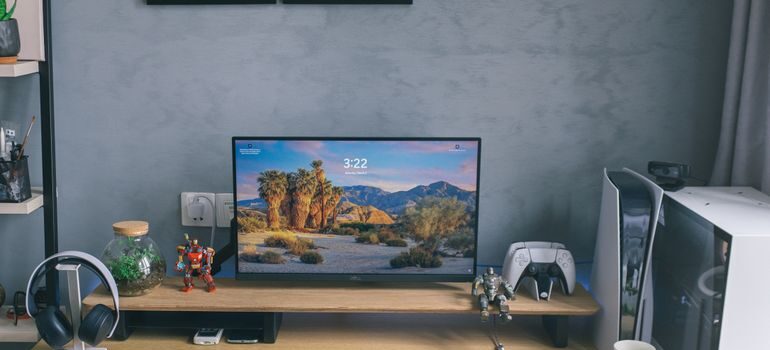
The workspace must function until the last day at the old address. It must also function on day one at the new one. The pace of moving a home office runs on a different clock than the rest of the household. The workspace gets packed last and unpacked first.
Inventory the Tech Before Anything Moves
The first practical step is a complete inventory of every device that will travel. Desktop computers and laptops. External monitors. Keyboards, mice, and docking stations. Webcams, microphones, and ring lights. Printers and scanners. External hard drives. Modems and routers, if they belong to the worker rather than the ISP.
Each item gets labeled with its origin location and its destination location at the new home office. Photographs of cable arrangements before unplugging save hours during the reassembly phase.
Decide What Stays Set Up Until the Last Day
A home office move usually takes over several days. Some items can be packed early. Books, decorative items, secondary monitors, and reference materials can go into boxes a week ahead.
The primary work surface stays operational longer. The main computer, the primary monitor, the chair, and the desk often stay set up until the final 24 hours. The phone, the keyboard, and the headset travel separately to the new address rather than going on the truck.
Pack Electronics With the Right Materials
Electronics need different packing materials than household items. Antistatic bubble wrap protects circuit boards from static damage. Original boxes work best when available. Foam inserts and dedicated dish-pack-style boxes work for monitors and screens.
Bay Area residential movers know how to wrap monitors, secure desktop towers, and protect cable arrangements. Cardboard alone does not protect electronics during transport, especially over rough roads.
Move the Desk and Chair Without Damage
The desk and chair are often the most overlooked items in a home office move. Ergonomic chairs have hydraulic cylinders, adjustable arms, and lumbar mechanisms that can break during rough handling. Desks with electric standing motors have wiring that needs to be disconnected before transport.
Coordination with furniture movers Bay Area keeps these pieces protected. The chair often travels disassembled. The desk travels with the standing-desk motor unplugged and the cables coiled inside.

Handle Files and Documents Separately
Home offices accumulate paper over time. Client files, contracts, tax records, business licenses, and reference materials. None of these belong in standard moving boxes mixed with kitchenware.
Filing cabinets often travel intact rather than being emptied. Bankers’ boxes labeled with category and date work for sorted papers. Confidential or sensitive documents travel with the worker in the family vehicle rather than on the moving truck.
Back Up Important Data Before Moving Day
A move always carries some level of risk, even with careful packing and experienced movers. Computers and external drives can usually be replaced if something unexpected happens during transport. Business data, client records, creative projects, and years of work often cannot.
Create a complete backup before disconnecting any equipment. Cloud storage provides one layer of protection, while an external backup drive offers another. Many professionals follow the 3-2-1 backup approach: three copies of important data, stored on two different types of media, with one copy kept off-site. This reduces the chance of losing valuable files because of hardware damage or accidental deletion during the move. Confirm that backups have completed successfully rather than assuming they worked. Open a few files from the backup location to verify they are accessible. Password managers should also be synchronized so account credentials remain available after reconnecting devices.
If the home office contains company-issued equipment, review any workplace policies before moving it. Some employers require encrypted storage devices, approved backup procedures, or documentation when relocating business hardware. Completing these steps before moving day avoids unnecessary delays once work resumes. A few hours spent protecting data before the move can prevent weeks of lost productivity afterward.
Check Internet Speeds at the New Address
Internet quality at the new home determines whether the home office functions on day one. ISP availability, speed tiers, and contract terms vary by address. The FCC national broadband map shows which providers serve any given address and what speeds are available.
Checking this before move day prevents a Monday discovery that the previous tenant’s plan does not match work requirements. ISP installations can take two to four weeks, so coordination starts at lease signing.
Plan for Power and Cable Routing at the New Property
A productive home office needs more electrical outlets than most rooms provide. Two monitors, a computer, a printer, a desk lamp, and a router can easily exceed what a single outlet handles. Phone chargers add more demand.
The new workspace gets a power inventory during the walkthrough. Surge protectors, cable trays, and routing strips all make the setup more livable. A messy cable tangle on day one becomes a permanent eyesore unless the routing gets planned from the start.
Test Every Piece of Equipment After Setup
Getting the desk assembled is only part of the process. The new workspace should be tested before the next workday begins so any problems can be addressed without affecting meetings or deadlines. Start with the internet connection and confirm that upload and download speeds meet work requirements. Reconnect monitors, docking stations, webcams, microphones, speakers, printers, and any other peripherals one device at a time. Testing each item individually makes it easier to identify connection issues.
Video conferencing software deserves special attention. Open the preferred meeting platform, check that the webcam produces a clear image, and verify that the microphone and speakers are using the correct audio devices. Remote workers often discover after moving that default audio settings changed when new hardware was connected.
Power management is another area worth checking. Surge protectors should not be overloaded, cables should have enough slack to allow desk adjustments, and standing desks should complete a full height adjustment without pulling on connected wires. Cable ties and labels added during setup make future maintenance much easier.
Finally, verify access to printers, shared network drives, VPN connections, and any office software that requires activation after hardware changes. Completing a full system check before the first workday allows the home office to operate normally from the moment work begins.
Use Storage if the New Workspace Is Not Ready
Some home office moves involve a gap. The new property might still need painting or flooring work in the office room. The build-out might extend past the closing date.
Storage in Hayward CA bridges the gap for the home office items during the wait. Climate-controlled options protect electronics, paper records, and wood furniture during the period before the new workspace is ready.
Coordinate the Move With Local Timing Flexibility
Home office moves benefit from local moving timing flexibility. The crew can schedule the office phase separately from the rest of the household. Bay Area local movers accommodate phased timing so the workspace transition fits the work schedule.
The most flexible timing comes from booking the move with adequate lead time.
Set Up the New Workspace on Day One
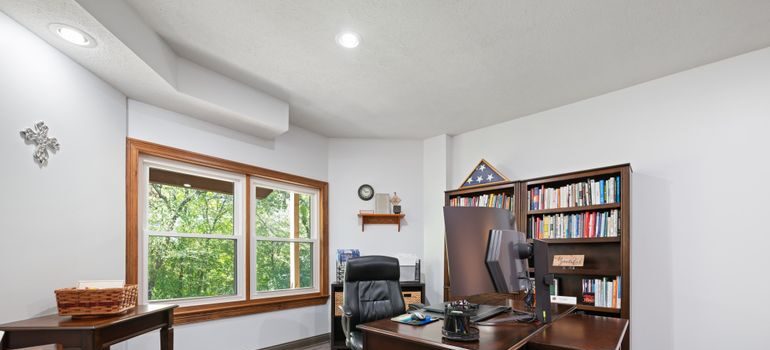
Moving a home office succeeds when the worker sits down at a working desk on day one. The new address must be ready. The first hours at the new home should include desk assembly, monitor reconnection, and internet activation.
The kitchen and the bedrooms can wait. The home office cannot. A first-day functioning workspace prevents the work momentum loss that lingers for weeks after a poorly planned move.
A Smooth Workspace Transition Is Possible
Moving a home office is one of the most consequential parts of any residential relocation today. The remote-work era has made the home workspace the difference between a productive Monday and a wasted week. Planning the tech, desk, internet, and workspace layout before move day turns a stressful transition into a smooth one. The right preparation lets the work continue as if the desk never moved.
Frequently Asked Questions
How is moving a home office different from a regular residential move?
A residential move can finish in a day. A home office move stretches the timeline because work continues through the move week. The primary workstation stays operational until the last day at the old address. Setup at the new property is the first priority on move-in day, not the last.
Which items should travel with me instead of the moving truck?
Laptops, primary phones, headsets, and any confidential client files travel with the worker in the family vehicle. External hard drives with critical data and small high-value items also belong in personal transport. Everything else goes on the truck with proper packing and labeling.
Do I need special packing materials for home office electronics?
Yes. Antistatic bubble wrap protects circuit boards from static damage. Original boxes work best when available. Foam inserts and dish-pack-style boxes protect monitors and screens. Standard cardboard alone does not provide enough protection for desktop towers, monitors, or networking equipment.
How early should I check internet service at the new address?
ISP coordination starts as soon as the lease is signed or the closing date is confirmed. New service installations can take two to four weeks. Static IP assignments and high-speed plans add more time. Waiting until move week often produces a Monday morning without internet.
Can the desk and ergonomic chair survive the move intact?
Yes, with proper handling. Ergonomic chairs have hydraulic cylinders and adjustable mechanisms that can break during rough loading. Standing desks have wiring that needs disconnecting before transport. A team experienced with office furniture knows how to disassemble, protect, and reassemble these pieces without damage.
Joy Patzner


David and his crew were wonderful. Very nice and VERY fast!!!

locations we serve
Alameda County

San Francisco County
Contra Costa County
San Mateo County